

The right car key cover for Maruti Suzuki cars depends on the key in your hand, not just the name on the boot. Neodrift's Maruti listings use four key shapes. One is a two-button remote with a fixed metal blade. The other three are bladeless smart keys: a squarish two-button key, a squarish three-button key and a rounded three-button key. Many Maruti models have shipped with more than one of these, so a Swift key can differ from another Swift key. Count the buttons, check for a blade, then match the photo. Our Maruti Suzuki car key covers are listed by model, and each listing shows every shape it comes in.
Quick answer
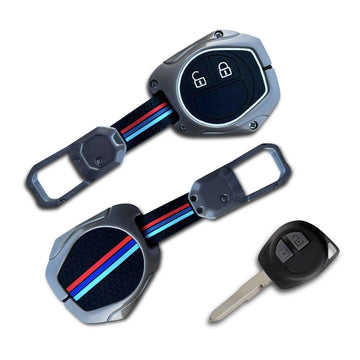
- A metal blade sticks out of the key: you have the two-button remote key. Every Maruti listing on our site except the Grand Vitara offers a cover for it.
- No blade, two buttons, squarish body: the two-button smart key.
- No blade, three buttons (lock, unlock, boot): a three-button smart key. It comes in a squarish body and a rounded, oval body, and they need different covers.
- "Shape 2" does not mean the same key on every listing. On the Maruti Suzuki Baleno page it is the two-button smart key. On the Maruti Suzuki Brezza page it is the rounded three-button key. Match the photo, not the number.
Why two Maruti cars of the same model can have different keys
On many Maruti models, the smart key comes with the higher trims. In published variant lists for the Maruti Suzuki Swift and Maruti Suzuki Dzire, for example, push-button start shows up on the ZXi trims but not on the VXi trims. A VXi owner turns a bladed key in the ignition. A ZXi owner keeps a smart key in a pocket and presses a button on the dashboard. Same car name, two different keys, two different covers.
Model years add to it. Keys change with new generations and facelifts, and a second-hand car may come with a spare that does not match the main key. If you bought your car used, check both keys before you order two covers.
That is why some of our Maruti listings carry one shape and others carry three. A cover is moulded around one outline and one button layout. Put a two-button smart key in a three-button cover and you get a loose fit and a dead button window. Put a bladed key in a smart-key cover and the blade has nowhere to go. Neither can be fixed with a pair of scissors.
The four Maruti key shapes, and how to tell them apart
Hold the key with the buttons facing you and go through these in order.
1. Two-button remote key with a fixed blade
A small, rounded plastic head with two buttons (lock and unlock), and a metal blade that sticks straight out. The blade does not fold away. You put it in the ignition and turn it. This is the key most people picture when they think of a Maruti, and it is Shape 1 on every Maruti listing on our site except the Maruti Suzuki Grand Vitara, which does not offer it.
2. Two-button smart key
A squarish, flat-faced key with two buttons stacked on one side and no blade showing. You keep it in your pocket or bag; the car starts with a button on the dashboard. On our listings it appears for the Maruti Suzuki Swift, Baleno, Dzire, Ertiga, Ignis, XL6 and Grand Vitara.
3. Three-button smart key, squarish body
The same flat, squarish body as shape 2, but with a third button for the boot, usually marked with a small car outline. On our listings it appears for the Maruti Suzuki Ertiga and Maruti Suzuki Dzire.
4. Three-button smart key, rounded body
An oval, teardrop-like key with three buttons in a row along one side: lock, unlock and boot. The outline is curved all round, with no straight edges. On our listings it appears for the Maruti Suzuki Baleno, Brezza, Ciaz, Ignis and S-Cross.
Shapes 3 and 4 both have three buttons, so this is where most wrong orders happen. Lay the key flat on a table. If its sides are straight and its corners are square, it is shape 3. If it looks like a smooth pebble, it is shape 4.
Car key cover for Maruti Suzuki: what each listing offers
This table is read from the shape options on each live listing. "Remote" is the two-button key with a blade.
| Model | Key shapes on the listing |
|---|---|
| Maruti Suzuki Swift | Remote · two-button smart key |
| Maruti Suzuki Baleno | Remote · two-button smart key · rounded three-button smart key |
| Maruti Suzuki Dzire | Remote · two-button smart key · squarish three-button smart key |
| Maruti Suzuki Ertiga | Remote · two-button smart key · squarish three-button smart key |
| Maruti Suzuki Ignis | Remote · two-button smart key · rounded three-button smart key |
| Maruti Suzuki Brezza / Vitara Brezza | Remote · rounded three-button smart key |
| Maruti Suzuki Ciaz and Maruti Suzuki S-Cross | Remote · rounded three-button smart key |
| Maruti Suzuki XL6 | Remote · two-button smart key |
| Maruti Suzuki Grand Vitara | Two-button smart key only |
| Maruti Suzuki WagonR, Alto K10, Celerio, Alto, Alto 800, S-Presso, Ritz, SX4 | Remote only |
Two things stand out. First, the remote key covers the most ground: it is the only shape on eight listings and an option on nine more. Second, the shape numbers move. On the Maruti Suzuki Ertiga and Dzire pages, Shape 3 is the squarish three-button key; on the Maruti Suzuki Baleno and Ignis pages, Shape 3 is the rounded one. That one detail causes more mix-ups than anything else.
If your Maruti is not in the table, or your key does not look like any of the four, use our find-your-key-cover page before you order.
A two-minute check before you order
- Take out the key you use every day, not the spare in the drawer, and check the spare separately if you want a cover for it too.
- Look for a metal blade. A blade means the remote key. No blade means a smart key.
- Count the buttons. Two or three.
- If it has three, check the outline. Straight sides and square corners, or a smooth oval?
- Open your model's listing and compare the photo of each shape with your key, side by side. Pick the photo, not the number.
Our car key cover guide goes through the same check for every brand, if you have keys for more than one car at home.
What a key cover actually protects against
Your Maruti key spends its life in pockets, bags and bowls next to coins and phones, and gets dropped on parking floors. The KeyShield listings say the cover protects the key from scratches, dust and accidental drops, fits snugly, and is designed to prevent accidental button presses. That last point matters more than it sounds. A key pressed by a phone in the same pocket can lock or unlock the car without you noticing.
A cover is not a sealed case. It keeps light splashes and dust off, but do not wash it with the key inside or leave a wet key sitting in one. And it does not fix a key that has already failed. If your remote has stopped working or works only at close range, the battery is the usual suspect. Our guide on changing your car key battery walks through it. Do that first, then fit the cover.
Pro tip: Photograph both sides of your key on a plain sheet of paper before you order. With the photo open next to the listing, comparing the button layout and outline takes seconds. It also helps if you ever need to ask our support team which shape fits.
Fitting and caring for the cover
- Fit it on a table, not in the car. Line the buttons up with the windows in the cover before you close it, so you are not pressing lock and unlock through a misaligned cover.
- Test every button once it is on, from a few steps away from the car. Lock, unlock and, on a three-button key, the boot.
- Smart key owners: test push-button start with the key in the cabin too, before you rely on it.
- To clean it, wipe with a damp cloth and let it air-dry. Avoid harsh chemicals, as the listings advise.
Common mistakes to avoid
- Ordering by model name alone. A Maruti Suzuki Baleno listing has three shapes. Picking one without looking at your key is a guess.
- Trusting the shape number. As the table shows, Shape 2 and Shape 3 are different keys on different listings.
- Confusing the two three-button smart keys. Square or rounded is the whole difference, and they are not interchangeable.
- Assuming the spare matches. Common on second-hand cars. Check it.
- Covering a dying key. If the range has dropped, change the battery before fitting the cover, or you will blame the cover for a battery problem.
FAQs
Which car key cover fits my Maruti Suzuki Swift?
The KeyShield cover for Maruti Suzuki Swift comes in two shapes: the remote key with a blade and the two-button smart key. If your Swift starts with a turn of the key, choose the remote. If it starts with a dashboard button, choose the smart key.
Is the Maruti Suzuki WagonR key cover the same as the Alto one?
Both listings show the same two-button remote key with a fixed blade, and each offers only that shape. Still, compare your own key with the photo before ordering, especially on an older car.
Will a key cover stop my key from working?
No. The cover sits around the key and the listings say it keeps access to all functions. If something stops working after fitting, the buttons are usually misaligned. Refit the cover, then check the key battery.
My Brezza has three buttons. Which shape do I pick?
On the Maruti Suzuki Brezza listing, the three-button option is the rounded smart key. If your key has three buttons but a squarish body, compare it carefully with the photo or use the find-your-key-cover page first.
My Maruti model is not listed. What now?
Check the key, not the car. If your key matches one of the four shapes, open the find-your-key-cover page or contact our support team with a photo of the key.
Protect the key you use every day
A Maruti key is small, but a lost or broken one is far more trouble to replace than a cover. Five minutes of checking gets you a cover that fits the first time. Find your model in our Maruti Suzuki car key covers collection, match the shape to your key, and see our guides to the Tata and Hyundai key ranges if there is another car in the family.
Cover photo: Daniel Andraski / Pexels