

The right car key cover for Hyundai cars is decided by your key, not by your car's name. Hyundai has used at least six key designs in India: smart keys with three or four buttons, two different flip keys, and newer oval keys. Most Hyundai models have come with more than one of them. So the Creta key in your pocket may not match the Creta key in a friend's pocket. Look at your key first: does a metal blade flip out, and how many buttons does it have? That one-minute check decides the fit. Neodrift's Hyundai car key covers are listed by model, and each listing shows every key shape it comes in.
Quick answer
- A blade swings out when you press a side button — you have a flip key. Hyundai has two: a rounded one and an angular one.
- No flip blade, three buttons (lock, unlock, boot) — a three-button smart key.
- No flip blade, four buttons — a four-button smart key. There are three versions, and the fourth button's symbol and the key's outline tell them apart.
- The shape number is not the same on every listing. "Shape 2" on the Hyundai Creta page is not "Shape 2" on the Hyundai Venue page. Match the photo, not the number.
Why one Hyundai model can have four different keys
Hyundai updates its keys with facelifts and new generations, and variants within one model year can differ too. Lower variants have often had a flip key, while higher variants got a smart key with push-button start. A Hyundai Creta bought in one year and a Hyundai Creta bought a few years later can carry very different keys. A second-hand car may even come with a spare key that does not match the main one.
That is why Neodrift's Hyundai listings carry so many options. The KeyShield key cover for Hyundai Creta comes in four shapes. The KeyShield key cover for Hyundai Verna and the KeyShield key cover for Hyundai i20 Elite come in five. Only the Hyundai Kona listing has a single shape.
A cover is moulded around one outline and one button layout. A three-button key in a four-button cover leaves a dead button window and a loose fit. A flip key in a smart-key cover has nowhere for the blade to go. Neither can be fixed at home, so the key in your hand is the only spec sheet that counts.
The six Hyundai key types, and how to tell them apart
Hold the key with the buttons facing you and work down this list.
1. Four-button smart key
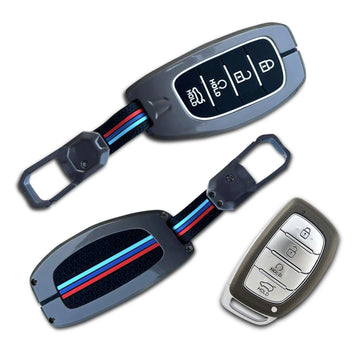
A smooth, rounded fob with no blade sticking out. It has four buttons stacked in a column: lock, unlock, a button marked "HOLD" with a round symbol, and the boot button, also marked "HOLD". This is Shape 1 on almost every Hyundai listing, from the Hyundai Grand i10 Nios to the Hyundai Tucson.
2. Three-button smart key
The same rounded body, but with three buttons: lock, unlock and the boot button. On most listings this is Shape 2. Count carefully: this key and the four-button one look alike at a glance, and a cover for one will not fit the other.
3. The second four-button smart key
Another four-button fob, close in outline to the first. Its fourth button carries a different symbol. On the Hyundai Creta listing it is Shape 4. On the Hyundai Venue listing it is Shape 2. If you have four buttons, put your key next to both listing photos and compare the symbols one by one.
4. Slim four-button smart key
A slimmer key with a silver edge and a black button face. It is offered on the Hyundai Verna and Hyundai Tucson listings (Shape 3 on both).
5. Rounded flip key
Press the side button and a metal blade swings out. This one has a rounded outline and three buttons: lock, unlock and boot. It appears on the Hyundai Creta, Hyundai Aura, Hyundai Xcent, Hyundai Grand i10 Nios and Hyundai i20 listings.
6. Angular flip key
Also a three-button flip key, but with a squarer, more angular body. It is offered on the Hyundai Verna and Hyundai i20 listings, and it is the only shape on the KeyShield key cover for Hyundai Kona. If you have a flip key, the outline is what separates these two, so trace it against both photos.
The Hyundai Venue is a special case. Besides two of the smart keys above, its listing has two oval covers (Shapes 4 and 5) with their buttons laid out side by side instead of in a column. If your Venue key is oval, start with those two and match the buttons in the photo.
If your key matches none of these, do not guess. Use Neodrift's find your key cover page, or send the team a photo of your key.
Car key cover for Hyundai: what each listing offers
| Hyundai model | Key types on the listing |
|---|---|
| Hyundai Creta, Aura, Xcent | Four-button smart key, three-button smart key, three-button flip key, second four-button smart key |
| Hyundai Verna | Four-button smart key, three-button smart key, slim four-button smart key, angular flip key, second four-button smart key |
| Hyundai Tucson | Four-button smart key, three-button smart key, slim four-button smart key, second four-button smart key |
| Hyundai i20 Elite, i20 Active | Four-button smart key, three-button smart key, rounded flip key, angular flip key, second four-button smart key |
| Hyundai Grand i10 Nios | Four-button smart key, three-button smart key, rounded flip key |
| Hyundai Grand i10 (older) | Four-button smart key, three-button smart key |
| Hyundai Elantra | Four-button smart key, three-button smart key, second four-button smart key |
| Hyundai Alcazar | The two four-button smart keys |
| Hyundai Venue | Four-button smart key, second four-button smart key, two oval covers |
| Hyundai Kona | Angular flip key only |
On models with several options, you pick the shape on the product page. Each shape has its own photo with the matching key next to the cover, so compare that photo with your key before you add it to the cart.
A two-minute check before you order
- Blade test. Find the side button and press it. If a blade swings out, you have a flip key. Then decide: rounded or angular outline?
- Count the buttons. Three or four. On a four-button key, look closely at the symbol on the button that is not lock, unlock or boot.
- Read the small print. Hyundai smart keys print "HOLD" under some buttons. Note which ones, then compare with the listing photo.
- Check the spare key. If you are covering both keys, make sure they are the same type. On a used car, do not assume.
- Still unsure? Send a clear photo of the button side to Neodrift and confirm the shape before you order.
Pro tip: ignore the shape number and go by the photo. Neodrift's Hyundai listings each number their shapes in their own order, so "Shape 2" means a three-button smart key on one model and a four-button key on another. Photograph your key from straight above, in daylight, and hold it next to the listing photo on your screen.
What a key cover actually protects against
A smart key holds the electronics that lock, unlock and, on push-button cars, let the car start. A cracked shell or a worn button is not a quick roadside fix, so it is worth protecting. The KeyShield listings and Neodrift's FAQs describe the cover's job like this:
- Scratches and scuffs. Keys share a pocket or bag with phones, coins and house keys. The cover takes the rubbing.
- Drops. A key that slips onto a parking floor hits the cover first.
- Dust. A snug fit keeps more dust away from the buttons.
- Accidental presses. The listings say the cover is designed to prevent accidental button presses. That matters on a key whose boot button is in your pocket all day.
- Grip. A smooth fob is easy to drop when you carry bags. The listing FAQ says a cover improves grip.
A note on water: car keys are not sealed, and neither is a cover. It adds a layer against splashes and drizzle on a two-wheeler ride or a monsoon walk to the car. It will not save a key that goes into a bucket or the washing machine. If your key gets soaked, take it out of the cover and let both dry.
The covers in the Hyundai listing photos have a metal-finish shell, a textured back panel and a keychain hook. For other brands, our brand-by-brand car key cover guide covers Maruti Suzuki, Tata, Mahindra and more, and the Tata key cover guide does the same shape check for Tata keys.
Fitting and caring for the cover
- Fit it on a table. Small screws and parts vanish in a car footwell.
- Seat the buttons first. Line each button up with its window, then close the shell. If it needs force, the shape is wrong. Stop there.
- Test every button next to the car. Lock, unlock and boot, and on a flip key, the blade too.
- Check the emergency key. Hyundai smart keys carry a small metal key that slides out of the end. You can see its tip in the listing photos. After fitting, make sure you can still reach it. You need it if the key battery dies.
- Wipe, do not soak. Neodrift's care advice is a damp cloth and air drying. Avoid harsh chemicals.
- Weak range usually means a weak battery. If you have to walk closer to the car before it responds, take the key out and follow our step-by-step car key battery guide.
Common mistakes to avoid
- Ordering by model name alone. The Hyundai Creta, Hyundai Verna and Hyundai i20 listings carry four or five shapes each.
- Trusting the shape number. It changes from listing to listing. The photo does not.
- Mixing up the two flip keys. Rounded and angular flip keys both have three buttons, but their bodies differ.
- Forcing the shell shut. That pressure lands on the circuit board inside the key.
- Treating the cover as a seal. It helps with splashes. It does not make the key safe in water.
FAQs
Which car key cover fits my Hyundai Creta?
The one that matches your key, not just the model. The Hyundai Creta listing has four shapes: two four-button smart keys, a three-button smart key and a rounded flip key. Do the blade test, count the buttons and compare the symbols with the photos.
Is the Hyundai Venue key cover the same as the Hyundai Creta one?
They share the two four-button smart key shapes. The Venue listing also has two oval covers that the Creta listing does not, and the Creta listing has a three-button smart key and a flip key that the Venue listing does not.
Will a key cover stop my Hyundai key from working?
A cover that matches your key leaves every button usable. Test all buttons beside the car right after fitting. If one does not respond, refit the key and make sure it is fully seated.
My Hyundai model is not listed. What now?
Hyundai shares key designs across models, so a cover listed under another model may fit if the outline and buttons match. Check with the find your key cover page or send a photo to the team before ordering.
Protect the key you use every day
Look at your key, match it to a photo, and the choice makes itself. Browse the Hyundai car key covers and pick your model. Popular picks include the KeyShield key cover for Hyundai Creta, the KeyShield key cover for Hyundai Venue, the KeyShield key cover for Hyundai Verna and the KeyShield key cover for Hyundai Grand i10 Nios. Kitting out a Creta? Our guide to car accessories for Hyundai Creta covers the rest of the car.
Cover photo: Daniel Andraski / Pexels